05 / SaaS Platform / 2026
Kairo
Managers do not need another course. They need private, useful practice close to the meetings that matter.
Services
- Product strategy
- Competitive review
- Information architecture
- UX/UI design
- AI interaction design
- Design system
- Prototyping
- Brand identity
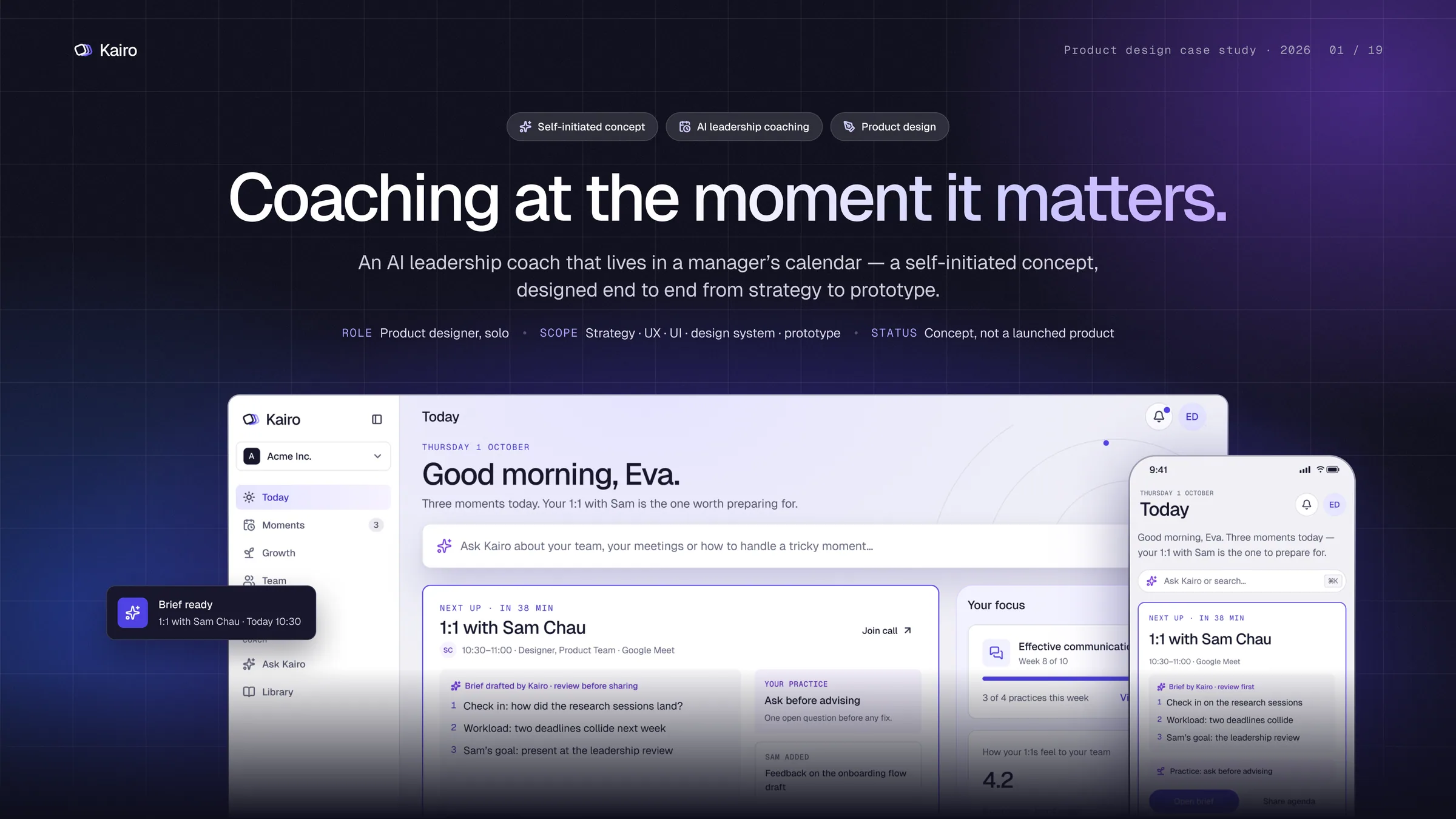
At a glance
- The problem
- New managers face difficult conversations every week, but most leadership support sits outside the moment when they need it. Team feedback also needs a safe way to reach them.
- What I designed
- A meeting-based AI coach: prepare before a 1:1, reflect after it, practise difficult conversations, build small habits, and show People teams only safe group-level patterns.
- My role
- Solo product designer — problem framing, desk research, competitive review, IA, brand, design system, UX/UI, prototype and design audit.
- Status
- Self-initiated product study. Designed end to end in 2026. No live-user results are claimed.
Who it is for
- Primary
- People managers, especially in their first two years
- Secondary
- Team members and People / L&D leaders
- Buyer
- Head of People or L&D
The idea is simple: leadership support should appear around the meetings where the work already happens — not in another dashboard.
Problem discovery
Not a training problem — a timing problem
01 What I started with
- Managers learn leadership while doing the job, often without support between formal training sessions.
- Key moments are predictable: 1:1s, reviews, presentations, hard conversations and new-hire weeks.
- I reviewed public product pages from AI coaching, people and workplace-insight products.
02 What the review showed
- Training is often separated from the moment when help is needed.
- Feedback is useful but can feel risky when tied to evaluation.
- AI coaching is common; the clearer opening was timing, privacy and trust.
It looked likeManagers need more leadership training.
The better problemManagers need short, private practice before and after real conversations.
03 The problem statement
How might coaching arrive just before a real meeting, help a manager prepare and reflect, and stay separate from employee evaluation?
Problem framing
What was happening — and what needed to change
I framed the product around real manager moments, current products, and the privacy limits workplace AI must respect.
Hard conversations happen every week.
Formal learning is too far from the moment of need.
Support before and after the meeting.
Team feedback is hard to share safely.
Anonymous feedback with clear minimum group sizes.
Coaching can sit beside performance scores and reviews.
Keep coaching separate from ratings and rankings.
Calendar data can look like employee monitoring.
Make permissions, thresholds and visibility clear in the UI.
Competitive review
What the market already solves — and where Kairo can be different
I used public product pages as desk research. The goal was not to copy features; it was to see where products place coaching, feedback, privacy and practice.
BetterUp
Strong on coaching at scale, with human coaching and AI support. Kairo can focus on attaching help to one upcoming meeting.
Culture Amp
AI Coach combines people data, coaching and role-play inside a broader people platform. Kairo keeps the coaching moment separate from formal evaluation.
Microsoft Viva Insights
Personal insights are designed to be private and not used for evaluation. Kairo makes privacy rules visible before sharing.
Lattice / performance tools
Coaching and feedback often sit close to goals, reviews and performance workflows. Kairo avoids scores and rankings so practice does not feel like assessment.
The opening for Kairo
- 01
Coach around a named meeting, not only an open chat.
- 02
Show why the AI made a suggestion and what it used.
- 03
Keep personal practice separate from evaluation.
- 04
Put privacy rules in the product.
Public product pages reviewed in October 2026. These are product observations, not user-test results.
Design goals
Four rules every screen had to follow
- 01
Coach in the flow
Show up before and after real meetings instead of asking managers to visit another dashboard.
- 02
Private by default
Keep reflections personal. Use anonymous pulses with minimum group sizes. Show People teams groups, not individuals.
- 03
Show the source
Every AI suggestion explains why it appeared and what data it used. Nothing is shared without approval.
- 04
Small, timely practice
Give one useful practice at a time. Show progress as repeated practice, not points.
Trade-offs
What I chose — and what it costs
Open AI chat
Meeting-based coaching.
Calendar access is needed.
Performance-tool coaching
Coaching stays separate from scores.
Less HR reporting.
Learn from everything
Only opted-in data.
Less data by design.
Auto-share drafts
Explicit approval + Undo.
One extra step.
Human + AI tier
AI-only for now.
No human escalation yet.
Information architecture
Five places, each answering one clear question
The structure follows a manager’s week: prepare, lead, reflect and grow. People leaders get a separate group view.
Today
“What matters today?”
- Next meeting
- Brief
- Focus
Moments
“Which meetings need preparation?”
- Week view
- Brief
- Share
- Reflect
Growth
“Am I getting better?”
- 10-week plan
- Practice
- Adjust plan
Team
“How does my team experience me?”
- Group feedback
- Commitments
People insights
“What is changing across groups?”
- Groups of 5+
- Quarter view
Everywhere
- Ask Kairo
- Notifications
- Privacy
- Slack / Teams nudges
- Mobile pulse
The navigation is organised by the manager’s questions, not by AI features. The product remains useful even when AI is unavailable.
Product structure
The week becomes the product structure
See the next moment → prepare → meet → reflect → build the next habit.
Today
Shows the next important meeting first, then the rest of the day.
Moments
A week view helps managers choose which conversations need preparation. Each meeting moves through brief → share → reflect.
Growth
A 10-week plan turns coaching into small repeated habits rather than a score.
Team + People
Team feedback is shown only at safe group sizes. People leaders see patterns, not individual scores.
Global
Ask Kairo stays one keystroke away for questions that do not belong to a specific meeting.
First run
Privacy before permissions
- User objective
- Get value before the first meeting without spending an hour setting things up.
- What makes it hard
- Calendar access and anonymous feedback both require trust from the manager and the company.
- Design response
- Explain the privacy promise first. Make the calendar optional. Let Kairo draft a first plan and explain why.
01Sign in
Welcome
SSO or magic link.
02Agree
Show the privacy promise before asking for access
What Kairo reads. What it never reads. Who can see what. These answers come before the calendar connection.
03Connect
Calendar is optional
Connect a calendar for automatic moments, or add meetings by hand.
04Start
First plan
Kairo creates a 10-week starting plan and explains the reasons behind it.
Edge caseIf calendar access is denied, manual moments remain available. If the baseline is skipped, Kairo starts with a simple plan and asks again later.
Key journey
Prepare for a 1:1 in under three minutes
- User objective
- Walk into the 1:1 prepared and let the other person see the agenda before the meeting.
- What makes it hard
- The brief is AI-generated, may use team feedback, and must never be shared by accident.
- Design response
- Nudge 30 minutes before. Show sources. Let the manager edit. Ask before sharing. Offer Undo.
01Notice
Today
The next moment appears first, with the brief ready.
02Prepare
A short brief, with a reason for every suggestion
The brief contains a summary, talking points and one practice. “Why this?” explains the source of each AI suggestion.
03Approve
Sharing is a decision, not an automatic action
The approval step says exactly what the other person will see and what stays private.
04Undo
Sharing stays reversible
After the agenda is shared, a clear confirmation appears with Undo. The manager can correct a mistake without searching through settings.
05Reflect
Two minutes after the meeting
The reflection is private to the manager. It asks what happened, what felt difficult and what to try next.
Key takeawayThe flow keeps the manager in control: prepare → review → approve → share → reflect.
Design ruleAI can draft. The manager decides.
Recovery casesIf the brief fails, use the standard template. If the meeting moves, regenerate it. If the other person has no Kairo account, send a plain calendar note.
Key decisions
Six decisions that shaped the product
Decision 01
Moments, not dashboards
- Challenge
- A separate coaching dashboard asks managers to leave the work they are already doing.
- Decision
- Make the upcoming meeting the main object. Give it a brief before and a reflection after.
- Why
- The help should arrive where the work already is.
- What it enables
- A week that reads as clear moments: brief ready, reflect, skipped or complete.
Decision 02
Explain the AI by default
- Challenge
- An AI brief is only useful if the manager can tell where it came from.
- Decision
- Every suggestion has “Why this?” and shows its sources. Drafts are clearly marked and editable.
- Why
- Trust grows when the system shows its limits and lets the person make the final call.
- What it enables
- Managers can check calendar events, notes and opted-in feedback before accepting a suggestion.
Decision 03
Coach the person, never score them
- Challenge
- Workplace data can easily turn a coaching tool into an evaluation tool.
- Decision
- No points, rankings or individual pulse scores. Team views show group patterns and commitments.
- Why
- Managers need a safe place to practise without feeling watched or graded.
- What it enables
- People leaders can see group patterns without turning Kairo into a manager scorecard.
Decision 04
Privacy rules the UI enforces
- Challenge
- A privacy promise can fail if a chart reveals too much.
- Decision
- Show manager averages only with 3+ responses and People-team views with 5+. Explain hidden data.
- Why
- Anonymity has to be built into the product, not left to policy.
- What it enables
- The same privacy promise appears where data could otherwise be exposed.
Decision 05
Rehearse the real conversation
- Challenge
- Generic role-play is less helpful than the conversation the manager is actually about to have.
- Decision
- Rehearse the upcoming 1:1 using only allowed information, then carry the useful opening line into the brief.
- Why
- AI earns its place when it helps with a real decision, not when it simply creates more chat.
- What it enables
- Sensitive health, legal and misconduct topics are declined and pointed to HR; low confidence is stated.
Decision 06
One practice per moment
- Challenge
- Leadership advice is endless, but managers often have only a few minutes between meetings.
- Decision
- Give one short practice before the meeting, a two-minute reflection after it, and a 10-week plan that adjusts over time.
- Why
- Small actions are easier to repeat than a large library of lessons.
- What it enables
- Progress is shown as repeated practice, not a score.
AI experience
Four rules for every AI surface
- Grounded
Show the sources.
- Editable
Drafts are not decisions.
- Bounded
Never record or listen.
- Reversible
Nothing is shared without approval.
The product
A coach that stays useful without becoming an evaluator
The final experience connects the manager’s week, meeting preparation, reflection and practice.
- What the manager gets
- A clear next meeting and ready brief.
- AI suggestions with visible sources.
- Approval before sharing.
- A private reflection after the meeting.
- Small practices that build over time.
- What People leaders get
Group patterns only, with minimum-size rules. No individual manager score.
- Global access
Ask Kairo stays one keystroke away for questions that do not belong to a specific meeting.
Edge cases
There is always a non-AI path
If the AI or an integration fails five minutes before a meeting, the manager is never blocked.
- Recovery
- Retry the AI, use the standard 1:1 template, reconnect the calendar, or keep notes manually.
- Why this matters
- The core job is preparing for the conversation. AI is a helper, not a requirement for the manager to continue.
Responsive
Three sizes, one clear job
Desktop keeps the full week and supporting detail. Tablet uses an icon rail. Mobile turns filters into bottom sheets and tables into simple person lists.
- Mobile pulse
- Team members can answer the anonymous pulse in about 30 seconds on mobile web.
- Responsive rule
- Keep the next action visible first; move secondary detail out of the way instead of shrinking everything.
Iteration
Auditing my own work: thirteen fixes
I checked the file through UX, UI and design-system lenses. The audit found issues that could break trust, accessibility or usability.
“Why this?” used only 2 pulse responses.
HighIt broke the 3+ privacy rule.
Show “4 of the last 6 responses” and keep the rule in the component.
Delete-all-data looked like a normal secondary action.
HighA destructive action looked too safe.
Use a clear danger style and trash icon.
Audit method: I also checked contrast, responsive widths, dates and privacy thresholds. These are design-file checks, not user research.
Design audit
Four fixes that changed the product
Two text colours failed WCAG AA at 4.37:1 and 4.33:1.
HighRe-alias the tokens so the text used here reaches at least 4.59:1.
The tablet team table needed more width than the row allowed.
HighLet the member column fill the space so the row action remains usable.
A date-based suggestion could become wrong on the first day of a month.
MediumUse “in the last four weeks” instead of fragile month wording.
Measured from the design file. None of these numbers are user results.
Design system
A system first, then the screens
The system was defined before the final screen set: 148 variables, 24 text styles, 34 component sets with 220 variants, and 122 icons. Indigo carries actions. Violet is reserved for AI. This keeps AI visible without making the whole interface feel like an AI product.
- Indigo 600#4f42e3
action - Violet 500#8b57f6
AI - Blue 500#3b6ef8
supporting blue - Ink 900#17172b
main text - Canvas#f1f1f5
background
- SansAaGeist — interface and headings
- Mono10:30Geist Mono — times, labels and data
Dark mode is specified in the design file but was not built in this concept.
Design outcome
What the work delivered
- Design outcomes
- A clear product thesis and four design rules.
- Five main destinations and ten mapped journeys.
- A token-based system behind 31 screens across three sizes.
- Privacy rules visible in the UI: thresholds, approval and Undo.
- Five clickable flows, reviewed through a design audit.
- Next
- Moderated sessions with new managers on the 1:1 preparation flow.
- Test the anonymous pulse with team members.
- Compare briefs with and without sources.
- Talk to IT and security buyers about calendar access.
- Known limits
The product is not launched. No real-user outcomes are claimed. Calendar access may be restricted by IT teams. Dark mode is specified but not built. There is no human-coach tier yet.
What I learned
Use the market to sharpen the problem.
“Another AI coach” was not enough.
Privacy is a UX problem.
Thresholds, empty states and approval steps make the promise real.
AI needs a moment and a decision.
The strongest features were tied to a real meeting and a clear next action.
Next: put the prototype in front of new managers, starting with the 1:1 preparation flow.